...
- Перейти на панель настройки объекта Дверь СКУД ZK C3-100, который создается на базе объекта Контроллер СКУД ZK C3-100.
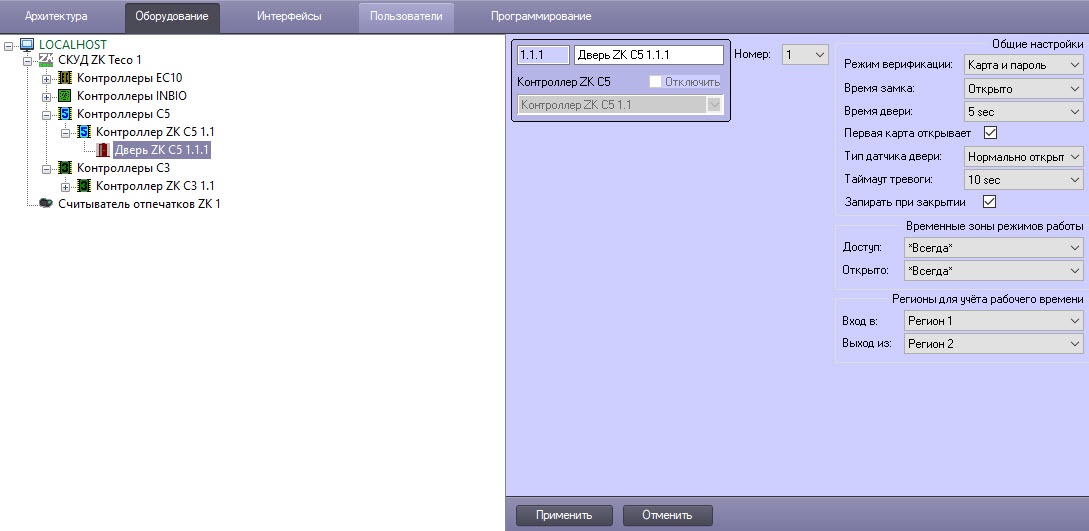
- From the Number: drop-down list select the number of the door Из раскрывающегося списка Номер (1).From the Type: drop-down list select the type of verification выбрать номер дери.
- Из раскрывающегося списка Тип (2). выбрать тип верификации.
- В поле Экстренный In the Emergency: field enter the password for door open (3) .
- In the Duress: field enter the password for door open and triggering the alarm event (4).
From the Type: drop-down list select the type of door sensor (5).
Note
The door sensor type affects the way pass events are generated.
Disable: the event about the user's pass is generated automatically, as soon as the user has been identified.
- Normal open/Normal close: the event about the user's pass is generated when the user actually passes (by closing or opening the reed switch of the door, respectively).
- From the Door hold alarm timeout: drop-down list select the time interval during which door is opened (6).
- Set the Close and lock checkbox to lock the door after its closing (7).
- From the Door relay: drop-down list select the time interval of opening the door after the card presenting (8). Select the Close value for permanent closing the door. Select the Open value for permanent opening the door.
- From the Punch: drop-down list select the time interval of card presenting (9).
Set The first card opens door checkbox to open the door using the first card (10).
Note.
Access level of first card for the door opening is configured in the panel of user editing in the Access Manager interface module. In the Level in first card mode field specify the corresponding access level.
 Image Removed
- Set the Enable checkbox to allow using of multicard combinations (11).
- From the drop-down list in the Multicard column select the required multicard combination (configuring of multicard combinations is given in the section, 12).
- From the Valid: drop-down list select the time zone in which the door is active (13). If the Never value is selected, the door will not operate.
From the Keep open: drop-down list select the time zone in which the door will be normally opened (14).
Note.
The door will be opened in not more than 1 minute after starting the specified time zone.
- From the Region In: drop-down list select the Region object located in the site of exit through the door (15).
- From the Region Out: drop-down list select the Region object located in the site of entry through the door (16).
- Click the Apply button (17).
To send the specified settings to controller click the Send configuration button on the settings panel of the AC ZK Controller C3-100 object.
- ввести пароль для открытия двери.
- В поле Под принуждением (4) ввести пароль для открытия двери и генерирования тревожного события.
- Из раскрывающегося списка Тип (5) выбрать тип датчика двери.
| Info |
|---|
|
Тип датчика двери влияет на способ генерации проходных событий: |
- Из раскрывающегося списка Тайм-аут тревоги (6) выбрать время, через которое дверь будет открыта.
Установить флажок Заблокировать (7), если необходимо заблокировать дверь после ее закрытия.
- Из раскрывающегося списка Реле двери (8) выбрать время, через которое будет открыта дверь после предъявления карты доступа:
- Закрыть - постоянное закрытие двери.
- Открыть - постоянное открытие двери.
- Из раскрывающегося списка Карта (9) выбрать время для предъявления карты доступа.
Установить флажок Заблокировать (10), если необходимо предъявление первой карты для открытия двери.
| Info |
|---|
|
| Уровень доступа первой карты настраивается на панели пользователей в интерфейсном модуле Бюро пропусков в параметре Level in first card mode. |
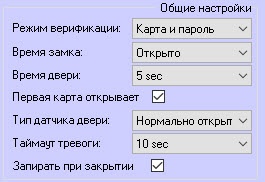 Image Added
- Установить флажок Включить (11), если необходимо разрешать использование групп мультикарт.
- Из раскрывающегося списка Комиссиорование (12) выбрать необходимую комбинацию мультикарт.
- Из раскрывающегося списка Текущая (13) выбрать временную зону, в которой дверь активна. Если выбрано значение Никогда, дверь не будет работать.
Из раскрывающегося списка Оставить (14) выбрать временную зону, в которой дверь будет нормально открыта.
| Info |
|---|
|
Дверь откроется не позднее, чем через 1 минуту после начала указанной временной зоны. |
- Из раскрывающегося списка В (13) выбрать регион, расположенный со стороны выхода двери.
- Из раскрывающегося списка Из (13) выбрать регион, расположенный со стороны входа двери.
- Нажать кнопку Применить (17).
Настройка двери ZK Teco завершенаConfiguring of the C3-100 door is completed.


