...
- Перейти на панель настройки считывателя HikVision.
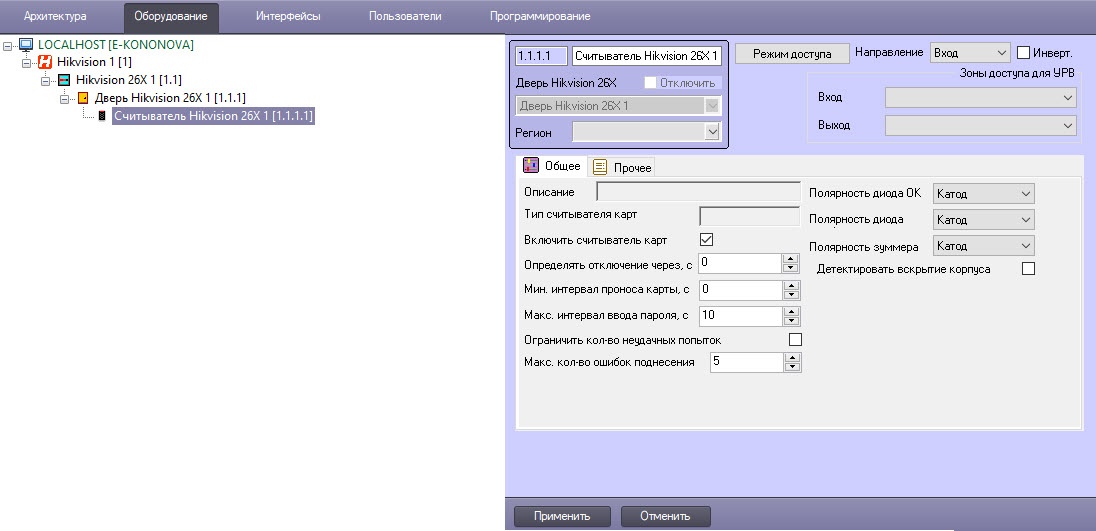 Image Added
- Из раскрывающегося списка Direction выбрать
- В поле Description находится
- В поле Reader type name
- Установить флажок Enable reader
- Из выпадающего списка OK LED polarity
- Из выпадающего списка Error LED polarity
- Из выпадающего списка Buzzer polarity
- В поле Min. card swiping internal, s
- В поле Max. internal for password digit, s
- Установить флажок Failed attempts limit
- В поле Max. times of card swiping failure
- Установить флажок Tampering detection
- В поле Detect when reader is offline for, s
...
{"serverDuration": 68, "requestCorrelationId": "c96ae90e7b9b511a"}


